Personal exploration
2026
Genome

Overview
Updating the Genome workspace
Genome generates color scales around base colors. I used AI-assisted development to modernize its workspace, exploring how my design-system experience could translate into a working browser tool.
Why Genome
I initially considered building a color-scale tool from scratch. Genome offered an existing foundation, letting me focus on how people configure, inspect, and use a palette while preserving its original generation engine.
Drag to compare: original Genome by Kevin Muldoon on the left; my modernization on the right. Both use the same starting colors and scale mapping.
Improvements
More control over the palette
Color editing
Edit color-family names, base colors and pinned colors in the workspace.
Shade selection
Add, remove and name shades, and check their contrast against a chosen background.

Select and name shades across every color family.
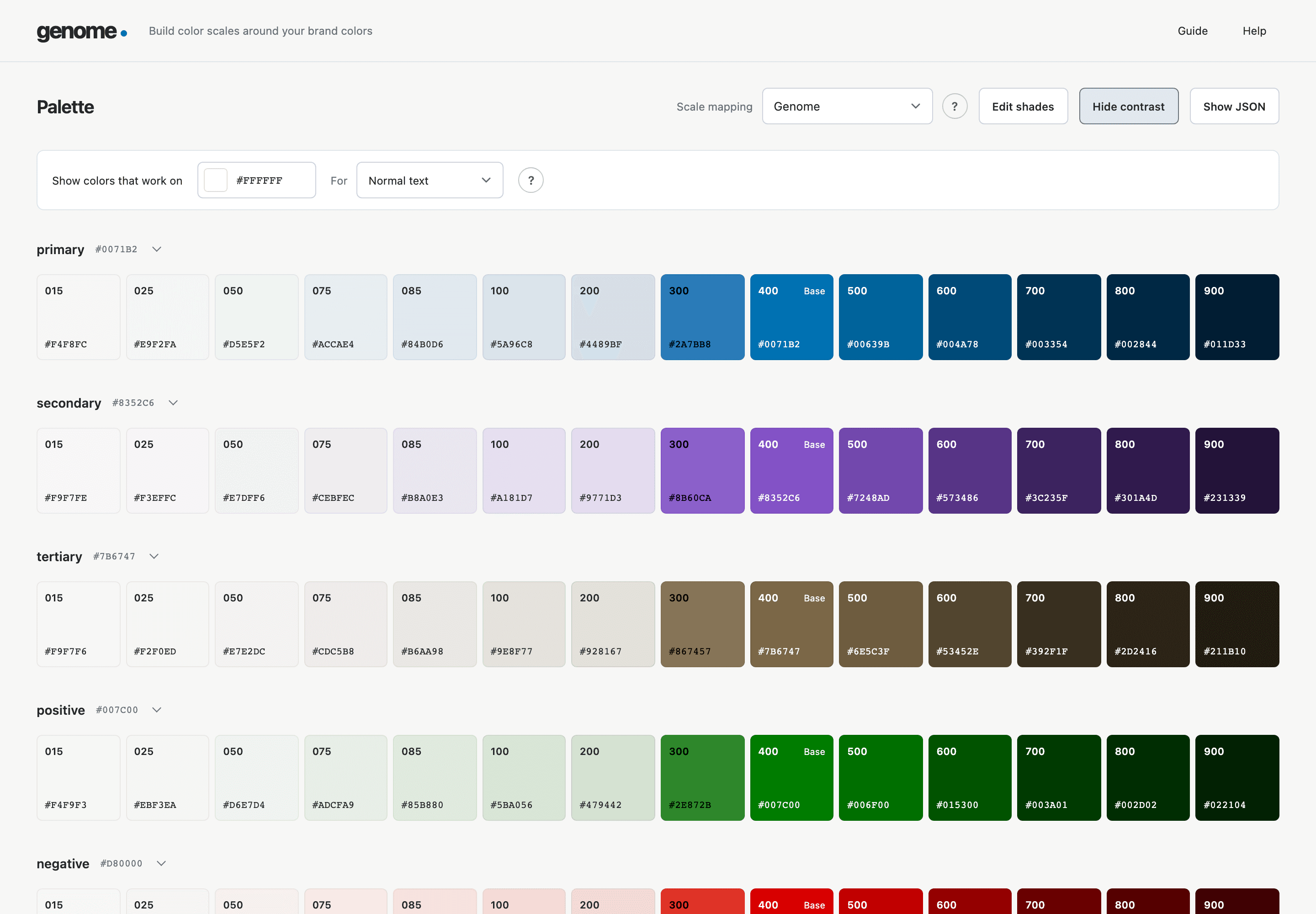
Inspect colors against a white background for normal-text contrast.
Saving and export
Browser saving and JSON export of the selected palette. Saving is specific to the browser and site address; exported JSON contains palette data and does not restore an editing session.
Reflection
From design decisions to a working tool
I used AI to help implement and refine the interface, test its behavior and publish the tool.
Credits
Built on Kevin Muldoon’s Genome palette generator. I preserved the original color-generation engine and updated the workspace and supporting workflows.
Explore more explorations